Reorganised by Repage from huggingface.co ·
Salesforce/blip2-opt-2.7b
BLIP-2, OPT-2.7b, pre-trained only
Salesforce / blip2-opt-2.7b like 447 Follow Salesforce AI Research 2.43k

Image-Text-to-Text
arxiv: 2301.12597
License: mit
Model card Files Files and versions xet
- Libraries
- Transformers How to use Salesforce/blip2-opt-2.7b with Transformers: # Use a pipeline as a high-level helper from transformers import pipeline pipe = pipeline("image-text-to-text", model="Salesforce/blip2-opt-2.7b") # Load model directly from transformers import AutoProcessor, AutoModelForMultimodalLM processor = AutoProcessor.from_pretrained("Salesforce/blip2-opt-2.7b") model = AutoModelForMultimodalLM.from_pretrained("Salesforce/blip2-opt-2.7b", device_map="auto")
- Notebooks
- Google Colab
- Kaggle
- Local Apps Settings
- vLLM How to use Salesforce/blip2-opt-2.7b with vLLM: Install from pip and serve model # Install vLLM from pip: pip install vllm # Start the vLLM server: vllm serve "Salesforce/blip2-opt-2.7b" # Call the server using curl (OpenAI-compatible API): curl -X POST "http://localhost:8000/v1/completions" \ -H "Content-Type: application/json" \ --data '{ "model": "Salesforce/blip2-opt-2.7b", "prompt": "Once upon a time,", "max_tokens": 512, "temperature": 0.5 }' Use Docker docker model run hf.co/Salesforce/blip2-opt-2.7b
- SGLang How to use Salesforce/blip2-opt-2.7b with SGLang: Install from pip and serve model # Install SGLang from pip: pip install sglang # Start the SGLang server: python3 -m sglang.launch_server \ --model-path "Salesforce/blip2-opt-2.7b" \ --host 0.0.0.0 \ --port 30000 # Call the server using curl (OpenAI-compatible API): curl -X POST "http://localhost:30000/v1/completions" \ -H "Content-Type: application/json" \ --data '{ "model": "Salesforce/blip2-opt-2.7b", "prompt": "Once upon a time,", "max_tokens": 512, "temperature": 0.5 }' Use Docker images docker run --gpus all \ --shm-size 32g \ -p…
- Docker Model Runner How to use Salesforce/blip2-opt-2.7b with Docker Model Runner: docker model run hf.co/Salesforce/blip2-opt-2.7b
BLIP-2, OPT-2.7b, pre-trained only
BLIP-2 model, leveraging OPT-2.7b (a large language model with 2.7 billion parameters). It was introduced in the paper BLIP-2: Bootstrapping Language-Image Pre-training with Frozen Image Encoders and Large Language Models by Li et al. and first released in this repository.
Disclaimer: The team releasing BLIP-2 did not write a model card for this model so this model card has been written by the Hugging Face team.
Model description
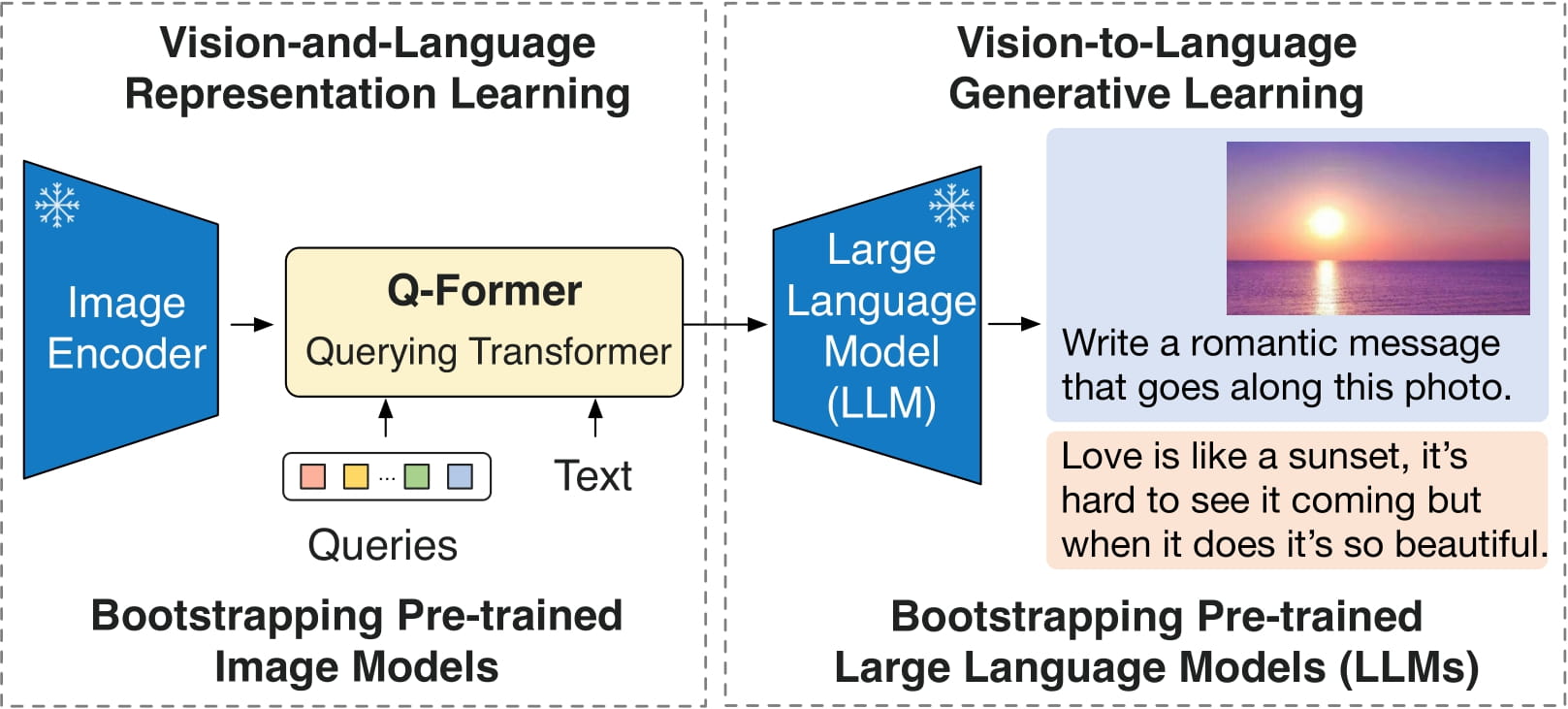
BLIP-2 consists of 3 models: a CLIP-like image encoder, a Querying Transformer (Q-Former) and a large language model.
The authors initialize the weights of the image encoder and large language model from pre-trained checkpoints and keep them frozen while training the Querying Transformer, which is a BERT-like Transformer encoder that maps a set of "query tokens" to query embeddings, which bridge the gap between the embedding space of the image encoder and the large language model.
The goal for the model is simply to predict the next text token, giving the query embeddings and the previous text.
This allows the model to be used for tasks like:
- image captioning
- visual question answering (VQA)
- chat-like conversations by feeding the image and the previous conversation as prompt to the model
Direct Use and Downstream Use
You can use the raw model for conditional text generation given an image and optional text. See the model hub to look for fine-tuned versions on a task that interests you.
Bias, Risks, Limitations, and Ethical Considerations
BLIP2-OPT uses off-the-shelf OPT as the language model. It inherits the same risks and limitations as mentioned in Meta's model card.
Like other large language models for which the diversity (or lack thereof) of training data induces downstream impact on the quality of our model, OPT-175B has limitations in terms of bias and safety. OPT-175B can also have quality issues in terms of generation diversity and hallucination. In general, OPT-175B is not immune from the plethora of issues that plague modern large language models.
BLIP2 is fine-tuned on image-text datasets (e.g. LAION ) collected from the internet. As a result the model itself is potentially vulnerable to generating equivalently inappropriate content or replicating inherent biases in the underlying data.
BLIP2 has not been tested in real world applications. It should not be directly deployed in any applications. Researchers should first carefully assess the safety and fairness of the model in relation to the specific context they’re being deployed within.
Ethical Considerations
This release is for research purposes only in support of an academic paper. Our models, datasets, and code are not specifically designed or evaluated for all downstream purposes. We strongly recommend users evaluate and address potential concerns related to accuracy, safety, and fairness before deploying this model. We encourage users to consider the common limitations of AI, comply with applicable laws, and leverage best practices when selecting use cases, particularly for high-risk scenarios where errors or misuse could significantly impact people’s lives, rights, or safety. For further guidance on use cases, refer to our AUP and AI AUP.
How to use
For code examples, we refer to the documentation.
Memory requirements
The memory requirements differ based on the precision one uses. One can use 4-bit inference using Bitsandbytes, which greatly reduce the memory requirements.
| dtype | Largest Layer or Residual Group | Total Size | Training using Adam |
|---|---|---|---|
| float32 | 490.94 MB | 14.43 GB | 57.72 GB |
| float16/bfloat16 | 245.47 MB | 7.21 GB | 28.86 GB |
| int8 | 122.73 MB | 3.61 GB | 14.43 GB |
| int4 | 61.37 MB | 1.8 GB | 7.21 GB |
Running the model on CPU
Click to expand
import requests
from PIL import Image
from transformers import Blip2Processor, Blip2ForConditionalGeneration

processor = Blip2Processor.from_pretrained("Salesforce/blip2-opt-2.7b")
model = Blip2ForConditionalGeneration.from_pretrained("Salesforce/blip2-opt-2.7b")

img_url = 'https://storage.googleapis.com/sfr-vision-language-research/BLIP/demo.jpg'
raw_image = Image.open(requests.get(img_url, stream=True).raw).convert('RGB')

question = "how many dogs are in the picture?"
inputs = processor(raw_image, question, return_tensors="pt")

out = model.generate(**inputs)
print(processor.decode(out[0], skip_special_tokens=True).strip())
Running the model on GPU
In full precision
# pip install accelerate
import requests
from PIL import Image
from transformers import Blip2Processor, Blip2ForConditionalGeneration

processor = Blip2Processor.from_pretrained("Salesforce/blip2-opt-2.7b")
model = Blip2ForConditionalGeneration.from_pretrained("Salesforce/blip2-opt-2.7b", device_map="auto")

img_url = 'https://storage.googleapis.com/sfr-vision-language-research/BLIP/demo.jpg'
raw_image = Image.open(requests.get(img_url, stream=True).raw).convert('RGB')

question = "how many dogs are in the picture?"
inputs = processor(raw_image, question, return_tensors="pt").to("cuda")

out = model.generate(**inputs)
print(processor.decode(out[0], skip_special_tokens=True).strip())
In half precision (float16)
# pip install accelerate
import torch
import requests
from PIL import Image
from transformers import Blip2Processor, Blip2ForConditionalGeneration

processor = Blip2Processor.from_pretrained("Salesforce/blip2-opt-2.7b")
model = Blip2ForConditionalGeneration.from_pretrained("Salesforce/blip2-opt-2.7b", torch_dtype=torch.float16, device_map="auto")

img_url = 'https://storage.googleapis.com/sfr-vision-language-research/BLIP/demo.jpg'
raw_image = Image.open(requests.get(img_url, stream=True).raw).convert('RGB')

question = "how many dogs are in the picture?"
inputs = processor(raw_image, question, return_tensors="pt").to("cuda", torch.float16)

out = model.generate(**inputs)
print(processor.decode(out[0], skip_special_tokens=True).strip())
In 8-bit precision (int8)
# pip install accelerate bitsandbytes
import torch
import requests
from PIL import Image
from transformers import Blip2Processor, Blip2ForConditionalGeneration

processor = Blip2Processor.from_pretrained("Salesforce/blip2-opt-2.7b")
model = Blip2ForConditionalGeneration.from_pretrained("Salesforce/blip2-opt-2.7b", load_in_8bit=True, device_map="auto")

img_url = 'https://storage.googleapis.com/sfr-vision-language-research/BLIP/demo.jpg'
raw_image = Image.open(requests.get(img_url, stream=True).raw).convert('RGB')

question = "how many dogs are in the picture?"
inputs = processor(raw_image, question, return_tensors="pt").to("cuda", torch.float16)

out = model.generate(**inputs)
print(processor.decode(out[0], skip_special_tokens=True).strip())- Downloads last month
- 443,760
Safetensors
Model size
4B params
Tensor type
F32
Files info
Inference Providers NEW
This model isn't deployed by any Inference Provider. 🙋 15 Ask for provider support
Model family and tasks
BLIP-2 combines a CLIP-like image encoder, a Querying Transformer, and a large language model, and is presented here for image captioning, visual question answering, and chat-like conversations.
Usage options
The page shows example usage through Transformers, vLLM, SGLang, and Docker Model Runner, plus CPU, GPU, float16, and int8 code examples.
Model tree for Salesforce/blip2-opt-2.7b
Adapters
52 models
Finetunes
12 models
Spaces using Salesforce/blip2-opt-2.7b 100
garibida/ReNoise-Inversion
tight-inversion/tight-inversion
Doubiiu/TrajectoryCrafter
ironjr/semantic-draw-canvas-sd3
Collection including Salesforce/blip2-opt-2.7b
BLIP2 models
Collection
A collection of all BLIP2 models! • 5 items • Updated Oct 31, 2025 • 21
Paper for Salesforce/blip2-opt-2.7b
BLIP-2: Bootstrapping Language-Image Pre-training with Frozen Image Encoders and Large Language Models
Paper • 2301.12597 • Published Jan 30, 2023 • 3